Visual designer

Build call flows by dragging, not coding.

Anyone on your team can create and manage communication workflows visually. Configure IVR menus, messaging sequences and engagement paths with drag and drop, then deploy in minutes rather than weeks.

Drag and drop Flow logic SMS and voice IVR builder Real-time deploy

The canvas

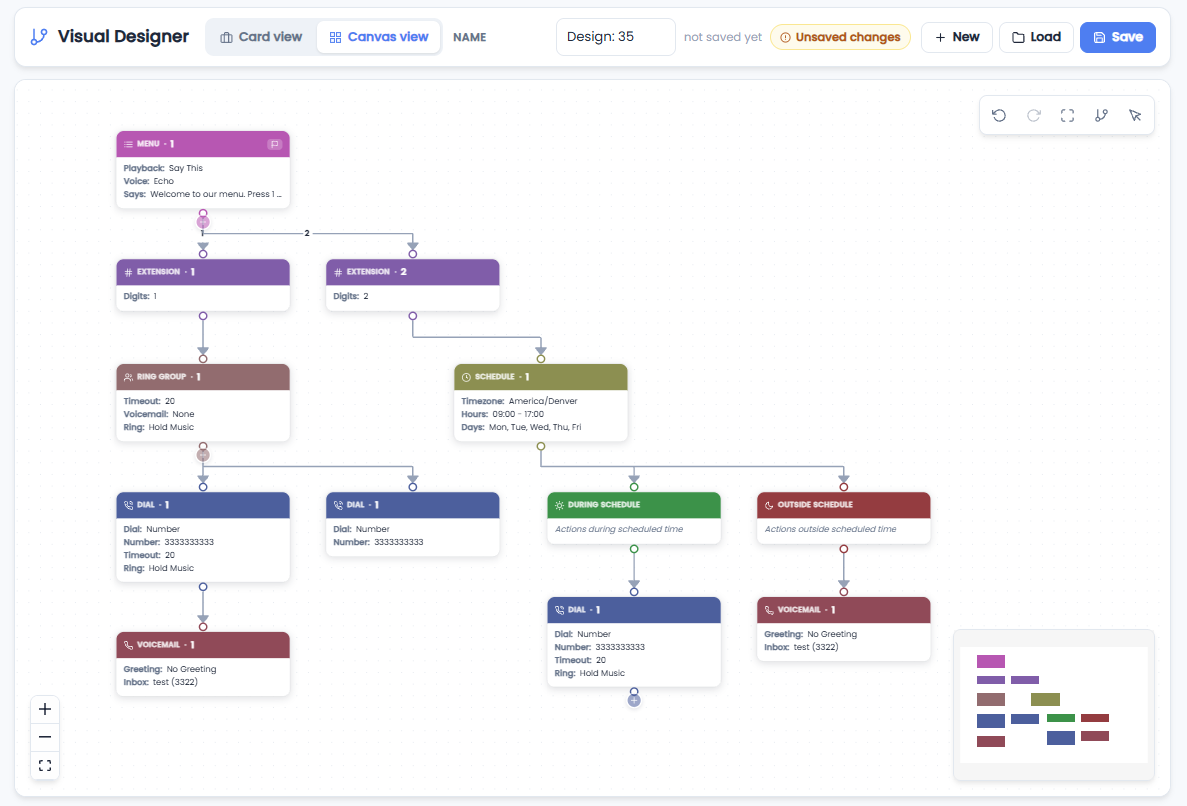
Your whole call flow on one screen.

Drop a menu node, add extensions for each key press, connect them to dial, ring group, queue or voicemail nodes, and save. Prompts are spoken with text-to-speech, so you never record an audio file.

  • Menus, extensions, dial, ring groups, queues, conferences, voicemail, play and hang-up nodes
  • Save, load and iterate designs without touching live traffic until you publish
  • Attach any phone number to any design from the numbers screen
More about call flows
harbor.ahoi.net/visual-designer
AHOI visual designer canvas with menu, dial and voicemail nodes

What you can do

Design, test and optimise without code.

No-code builder

A visual interface for developers and non-technical users alike. Build complex logic with simple drag-and-drop actions.

Prebuilt templates

Start from appointment reminders, surveys or onboarding sequences and customise them to fit.

A/B testing

Try different paths, message variants and timing to keep improving effectiveness and conversion.

Live analytics

Real-time insight into interactions, flow performance and engagement through dashboards and reports.

Building blocks

Every node you need.

Combine these on the canvas to build anything from a two-option menu to a full contact-centre front door.

MenuSpeak a prompt, branch on key press
DialRing a number or SIP device with a timeout
Ring groupRing several destinations at once
QueueHold callers for the next available agent
ConferenceBridge callers into a shared room
VoicemailSend to an inbox with transcription
PlayPlay audio or text-to-speech
Hang upEnd the call cleanly

How it works

Live in three steps.

1

Design

Start from a template or a blank canvas and drag nodes into place. Type your prompts and the platform speaks them.

2

Connect a number

Point any of your phone numbers at the design. Changes take effect the moment you save.

3

Measure and refine

Watch where callers go and where they drop, then adjust the flow and republish in seconds.

Get started

Ready to build without code?

Start designing communication workflows with the AHOI Visual Designer today. Our team will have you up and running in minutes.